
Samsung Galaxy S21 FE 5G Back Cover Replacement
This price is for the SM-G990E. To find your model number, open Settings, scroll down and tap About phone. The model number is on that screen.
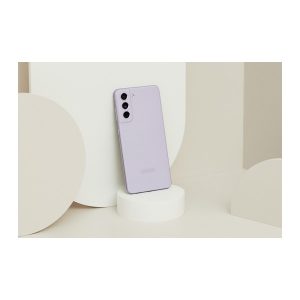
Three months warranty on the part and the work. Installed in under three working days.
- Samsung authorised service centre
- Original Samsung parts
- Listed on samsung.com as the Durban repair partner
- Serving Umhlanga and Durban since 2007
Rather have us call you?
Leave your name and number. We will call you back to confirm stock and a time that suits you.
The S21 FE's rear cover is tough polycarbonate with the camera bump moulded in. A hard drop can still crack or split it, and once the adhesive lets go the cover lifts and dust finds its way inside.
An original Samsung cover in your phone's colour puts that right. We remove the damaged cover, clean the frame and bond the new one properly. Part and fitting are in the price shown.
Signs you need this repair
- Split or crack in the cover near the camera bump
- Cover creaks or flexes when you press the back
- Gap opening between the cover and the frame
- Scuffed and scratched to the point a case cannot hide it
Samsung Galaxy S21 FE 5G at a glance
| Released | January 2022 |
| Display | 6.4 inch Dynamic AMOLED 2X, 120Hz |
| Battery | 4500mAh |
Common questions
Is the FE back glass or plastic?
Polycarbonate, so it will not shatter the way glass backs do, but it cracks and splits under a sharp knock and scratches with time. Replacement covers are original Samsung parts in the phone's launch colours, so Olive, Graphite, Lavender and White are all matchable.
Why replace it rather than just glue it down?
Household glue seals nothing and makes the next repair harder, because the cover has to come off for battery and port work. We fit a new cover with proper adhesive cut for this model, which is how the seal against dust and splashes is meant to work.
How should I prepare the phone before bringing it in?
Nothing special is needed for a back cover job. Bring the phone and your usual unlock method so we can test the cameras and wireless charging afterwards. A recent backup is always worth having before any repair, and Smart Switch or Google backup both do the job well.
Other repairs for this device
Working out what is wrong
If you are not certain what has failed, these work through the symptoms.
- The screen stays black
- It will not charge
- The charge does not last the day
- A green or pink line down the display
- It went in water