
Samsung Galaxy A06 Back Cover Replacement
This price is for the SM-A065 and SM-A065F. To find your model number, open Settings, scroll down and tap About phone. The model number is on that screen.
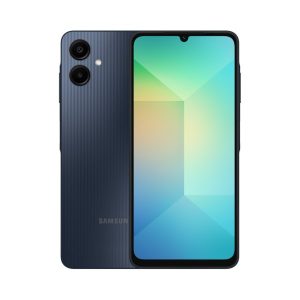
Three months warranty on the part and the work. Installed in under three working days.
- Samsung authorised service centre
- Original Samsung parts
- Listed on samsung.com as the Durban repair partner
- Serving Umhlanga and Durban since 2007
Rather have us call you?
Leave your name and number. We will call you back to confirm stock and a time that suits you.
The A06 has a plastic back cover, and a cracked or badly scuffed one does more than look tired. Gaps let dust and moisture in, and a loose cover flexes against the parts underneath.
We replace it with an original Samsung cover for the SM-A065, clipped and seated the way the factory intended. Part and fitting are included in the price shown.
Signs you need this repair
- Back cover is cracked or has a corner missing
- Cover clicks or flexes when you press it
- Gap along the edge where the cover no longer sits flush
- Deep scratches that catch your finger
Samsung Galaxy A06 at a glance
| Released | 2024 |
| Display | 6.7 inch PLS LCD |
| Battery | 5000mAh |
Common questions
Is a cracked plastic back really worth replacing?
On a phone you plan to keep, yes. A cracked cover lets dust and moisture reach the battery and boards, and sharp edges snag pockets. The cover itself is one of the more affordable parts, with fitting included in the price shown.
Can I get the new A06 cover in a different colour?
Covers are made in the colours Samsung produced for the A06. Tell us which colour you want when you get in touch and we will confirm what is available for the SM-A065 before you come through.
Will you check inside the phone while the cover is off?
We work with the phone open during the fit, so anything obvious like a swollen battery or corrosion gets flagged. If we spot a problem we tell you first. Nothing extra gets repaired without your go-ahead.
Other repairs for this device
Working out what is wrong
If you are not certain what has failed, these work through the symptoms.
- The screen stays black
- It will not charge
- The charge does not last the day
- A green or pink line down the display
- It went in water