
Samsung Galaxy Tab S9+ 5G Screen Replacement
This price is for the SM-X816B. To find your model number, open Settings, scroll down and tap About phone. The model number is on that screen.
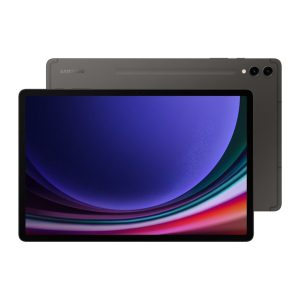
Three months warranty on the part and the work. Installed in under three working days.
- Samsung authorised service centre
- Original Samsung parts
- Listed on samsung.com as the Durban repair partner
- Serving Umhlanga and Durban since 2007
Rather have us call you?
Leave your name and number. We will call you back to confirm stock and a time that suits you.
On the Tab S9+ the display is the whole experience, so a green line, a dark blotch or a shattered corner is hard to live with. AMOLED damage also spreads, and a small fault can grow across the panel within days.
The repair is a complete assembly swap using the original Samsung Dynamic AMOLED 2X part for the SM-X816B. Brightness, colour and the 120Hz refresh all return to spec, and the S Pen tracks like new. Part and fitting are included in the price shown.
Signs you need this repair
- Thin green line from top to bottom
- Purple and black smudge growing under the glass
- Screen went black after a drop but it still vibrates
- Rainbow shimmer around a cracked area
Samsung Galaxy Tab S9+ 5G at a glance
| Display | 12.4 inch Dynamic AMOLED 2X, 120Hz |
| Battery | 10090mAh |
| Released | August 2023 |
Common questions
The screen is black but the tablet still makes sounds. Is that repairable?
Usually, yes. Sound and vibration with no picture points to a failed panel rather than a dead tablet, especially after a drop. We test it first to rule out other causes, then fit the original AMOLED assembly. Your data is untouched by the repair and will be there when the screen comes back on.
How do I get my files off the tablet if the screen shows nothing?
In most cases you will not need to, because a screen replacement leaves the storage alone and everything reappears on the new panel. If you would still like a backup first, mention it when you bring the tablet in and we will advise on the options for your situation.
Do you replace just the glass, or the whole display?
The whole assembly. On the Tab S9+ the glass, AMOLED panel and touch layer are bonded together by Samsung, and separating them is not how the factory or its service network works. Fitting the complete original part is what keeps colour, brightness and S Pen accuracy at factory standard.
Working out what is wrong
Not every screen fault needs a new screen.